Wednesday, January 29, 2014

Radically different color vision

When we snorkel in a tropical coral reef we are amazed at the colorful displays of the marine fauna and flora. Then we wonder why some of the fish are so flashy, making them conspicuous to predators.

As we wrote in our post on Why are animals colourful? Sex and violence, seeing and signals, Justin Marshall first showed a video snorkeling in a coral reef with a camcorder with spectral sensitivities close to ours, then he showed the same scene using a camcorder with spectral sensitivities close those of coral fish and all the sudden the fish could no longer be distinguished from the background.

In his presentation, Justin Marshall also described how stomatopods like the mantis shrimp are masters of color vision because on top of multiple spectral channels they have sensors for both linear and circular polarization. Shortly thereafter we reported in Nature's almost perfect quarter-wave retarder on Justin Marshall's new paper revealing how the mantis shrimp detects polarization.

How color vision works in the mantis shrimp had remained a mystery, at least until now. Justin Marshall and his collaborators have just published the paper A Different Form of Color Vision in Mantis Shrimp in Science 24 January 2014: Vol. 343 pp. 411-413 (membership required, or check in your local library). It turns out that unlike other animals, mantis shrimp do not have a color-opponent coding system based on a processing system of multiple dichromatic comparisons.

Instead, it appears that their color vision system is based on temporal signaling combined with scanning eye movements, enabling a type of color recognition rather than color discrimination. This would enable the mantis shrimp to make quick and reliable determinations of color, without the processing delay required for a multidimensional color space. This fits their rapid-fire lifestyle of combat and territoriality.

The next step could be to unveil the details of the neural processing from the receptors.

The 2014 (30th) Japan Prize

On 23 April 2014, Yasuharu Suematsu, Honorary Professor of Tokyo Institute of Technology, will be bestowed the 2014 (30th) Japan Prize in Electronics, Information and Communication for his pioneering research on semiconductor lasers for high-capacity long-distance optical fiber communication

Dr. Yasuharu Suematsu pioneered the way for high-capacity long-distance optical fiber communication, which is the core technology in our information networks, especially the Internet. It was realized through the development of semiconductor lasers capable of operating with optical fibers at a wavelength band having low transmission loss, as well as operating with stable wavelength under high-speed modulation.

The prosperity of the Internet would not have been possible without the high-capacity long-distance optical fiber transmission system using combination of light sources, which can generate high-speed modulation optical signal, and low-loss optical fiber, which can transmit optical signal across long distances. Despite the demonstration of semiconductor lasers in 1962 and the prediction of the nature of low-loss property of optical silica fiber in 1966, scientific and technological breakthroughs were still needed to establish the core technologies for such transmission systems. In particular, semiconductor lasers at the time were not applicable for such systems due to the instability of the lasing wavelength under rapid output power modulation to generate information signal.

From early on, Dr. Suematsu was proposing a high-performance transmission system using optical fiber. He identified the requirements of lasers and led the development of semiconductor lasers for high-capacity long-distance optical fiber transmission from an engineering approach, covering a wide range of disciplines from theory to materials. In 1974, Dr. Suematsu proposed the integration of reflectors with phase-shifted periodic structures into semiconductor lasers, which led to the concept of dynamic single-mode lasers having stable lasing wavelength even under high-speed modulation. He also realized in 1979, the room-temperature continuous-wave operation of InGaAsP lasers in the 1.5-μm band, the wavelength range with lowest loss in the optical fiber.

In 1981, he combined these technologies and achieved the room-temperature continuous-wave operation of an InGaAsP laser integrated with phase-shifted reflectors in the 1.5-μm band, thereby becoming the world’s first to demonstrate dynamic single mode operation. Before his achievement, realization of integrated lasers was considered technologically too difficult, however, his efforts finally opened up the way for high-capacity long-distance optical fiber communication. Dynamic single mode lasers have become the standard for light sources in present-day high-capacity optical fiber transmission systems in overland cables and intercontinental submarine cables.

Today, there is an ever-growing demand for high-capacity long-distance optical fiber communication, which has now become a part of our social infrastructure. It is expected that the future growth in the capacity of optical transmission systems will not only benefit ordinary communications and video transmissions, but will also lead to the dissemination of new systems in our society, such as telemedical services with real-time transmission of ultra high-resolution video.

Anticipating the future requirements, Dr. Suematsu combined theory and experiments to open up a new paradigm in semiconductor lasers. Furthermore, his approach in achieving dynamic single-mode operation at the optical transmission wavelength was an excellent example of how an engineering research should be. As a result, he has made indispensable contributions to forming the foundation of today’s information society. Dr. Suematsu’s pioneering research achievements are thereby deemed most eminently deserving of the 2014 Japan Prize given to honor contributions in the field of “Electronics, Information and Communication.”

末松安晴博士は、光ファイバーの損失が最小となる波長の光を発し、かつ高速変調時に波長変動が抑制できる半導体レーザーを実現して、インターネットをはじめとする情報ネットワークを支える大容量長距離光ファイバー通信に道を拓いた。

インターネットは、高速変調が可能な光源と低損失の光ファイバーを用いた大容量長距離光通信により支えられている。しかし1962年に半導体レーザーが作られ、1966年に光ファイバーの低損失予測が提唱されても、その根幹を支える技術が確立するまでには、学術的・技術的ブレークスルーが必要であった。特に、当時の半導体レーザーは高速変調時の発振波長が変動することから、大容量の光ファイバー通信に適用することができなかった。

末松博士は、光ファイバーを使用する高性能伝送システムを早くから提唱し、実現すべきシステムから必要とされるレーザーの特性を定めて、理論から材料までの広範な分野をカバーした工学的アプローチで大容量長距離通信用途の半導体レーザー開発を先導した。まず1974年に位相シフトを有する周期的構造を用いた反射器を半導体レーザーに集積することを提案し、高速変調時に発振波長が安定する動的単一モードレーザーの概念へと発展させた。並行して、光ファイバーの損失が最小となる1.5µm帯で発振するInGaAsPレーザーの室温連続発振を実現した。1981年には、これらの技術を組み合わせ、位相シフトを有する反射器を集積したInGaAsPレーザーを1.5µm帯で室温連続発振させ、動的単一モード動作を世界で初めて実証した。当初、集積レーザーは技術的に難しいとみられていたが、これを覆して大容量長距離光ファイバー通信への道を拓いたのである。現在、動的単一モードレーザーは、大容量光ファイバー通信の光源として、陸上光幹線、大陸間海底光幹線に遍く使われている。

今日、社会基盤となった大容量長距離光ファイバー通信への要求はとどまるところがない。今後、光通信が一層大容量化することにより、通常の通信や動画配信にとどまらず、超高精細画像の実時間伝送による遠隔医療など新たなシステムが社会に広く普及していくと期待されている。

要求される性能を予想し、理論と実験を組み合わせて新たなパラダイムを通信用半導体レーザーにもたらし、光通信波長で動的単一モード発振を実現した末松博士の業績は、工学研究のあるべき姿を示しており、世界を先導して現在の情報化社会の基盤の形成に不可欠な貢献をした。末松安晴博士の業績は「エレクトロニクス、情報、通信」分野における貢献を称える2014年日本国際賞にふさわしいと考える。

Tuesday, January 21, 2014

Data-Driven Discovery Initiative

The Gordon and Betty Moore Foundation has announced an open call for applications for its brand-new Data-Driven Discovery Investigator competition. The foundation’s science program expects to offer about 15 awards this year to selected investigators at ~$1.5 million each ($200-300K/year for five years).

This represents a major investment—likely the largest private investment—in individuals who are pushing the frontiers of a new kind of data-driven science—inherently multidisciplinary, combining natural sciences with methods from statistics and computer science. The competition seeks innovators with bold ideas and a willingness to strike out in new directions and take risks with the potential for huge payoffs in data-intensive science.

Apply Here

Friday, January 3, 2014

Storage Investments in 2013

The investments statistics in the storage market for 2013 are out. There has been the same number of merger and acquisition deals as in 2012, namely 25, for a total of $9.5 billion. The median deal size for 2013 was $110 million, with a price to revenue median of 5×. Seventeen of the transactions were technology focused (median size $98, median P/R 6×) and eight were business focused ($214 million, resp. 1×).

As for venture funding in storage, there has been a slight decline from $978 million in 2012 to $955 million last year. These investments consisted of 43 rounds of $22.2 million average size. The second half of the calendar year was particularly strong with $249 million in the 3rd quarter and $249 million in the 4th quarter.

Both Seagate and Western Digital introduced very competitively priced high quality data center grade 4 TB hard disk drives. Solid state drives (flash memory) has become much faster by moving from the SATA to the PCI interface, while prices kept coming down. When you are bound by I/O rate and durability, flash memory has become less expensive than hard disks.

While storage drives have become very inexpensive on a per TB price, business people have learned the virtues of data mining, now called big data analytics. This combination of low storage price and new analytic skills is prompting organizations to retain more of their data and harvest it. Data has become the new gold.

Just having petabytes of data is not very useful: you have to be able to access and deliver it. This is not straightforward and this is why so much investment is occurring in the storage industry. Those who can solve the data access and delivery problem will be the ones building long lasting successful businesses and are receiving the investors' attention.

Monday, December 16, 2013

Business Model Innovation

A cute video on business model innovation from the University of St.Gallen (HSG):

Saturday, November 30, 2013

Setting up the Volumes in a NAS

In the case of a local disk, there are typically two file system layers: the partitions and for each partition the directory. A NAS is a storage system and as such has many more layers. Unfortunately the terminology is completely different. For example, we do not talk about disks but about volumes. Instead of abstraction layers, we talk about virtualization. Instead of drives, in the case of NAS we talk of bays.

Let us consider a storage system with two bays and and some system flash memory. We will focus on the Synology system with the DSM operating system (built on top of Debian). The flash memory holds the operating system and the system configuration. This memory is not visible to the user or administrator. When the system is first powered up, the Synology Assistant downloaded from the web (also on the CD-ROM, but not necessarily the latest version) is run and it scans the LAN to find the Synology products. You assign a fixed IP address and install the DSM image you also downloaded from the Synology site.

After the DSM has been installed and booted up, you log into your NAS from a browser and do all the administration from there. The browser has to have Java enabled, because the GUI for DSM is an applet in a browser. You keep the Assistant around because it makes a nice status display with minimal overhead.

The next step is to format the disks and set up the directories. The first time around you do a low-level formatting, because you have to map out the bad sectors. After that, you can do quick formatting, because you just have to build the directories at the various virtualization layers and map the layers. Unfortunately the terminology in the DSM manual is a little confusing. Setting up the storage carriers is called "formatting," although you will do a much more elaborate task. You do not use one of the DSM control panels, but a separate application not shown by default on the desktop and called Storage Manager.

By default, you get a Synology Hybrid RAID, but in the case of a system with two equal disks you do not want that. At the lowest level we have a bunch of blocks on a bunch of disks. Locally, DSM runs the ext4 file system, which sees this as a number of disks with partitions and each partition having an ext4 file system.

In the hybrid configuration, each drive is divided into partitions of 500 GB size. A virtualization layer is then created where all partitions are pooled and the partitions are regrouped as follows. In the case of RAID1, one partition is made the primary, and another partition on a different drive is made its secondary onto which the primary is mirrored. This process continues until all partitions are allocated, then a new virtualization is performed where all primaries are concatenated and presented as a single primary volume. Similarly, the secondaries are concatenated in a single secondary volume.

The reason Synology has introduced the hybrid RAID concept is that in practice the customers of its very inexpensive products fill them up with whatever unused disks they have laying around. In a conventional RAID, the size of the NAS would be that of the smallest disk, with the remaining sectors of the larger disks remaining wasted. If you have a server with 4 or 5 bays, with hybrid you can use all or almost all sectors available.

With 4 TB HDD available in the red flavor for about $200, a 2-bay NAS should do it in the typical SOHO application. At that price, you want to get two equal-size drives. By the way, with only 2 drives, even with hybrid you can only use the sectors available in the smallest drive, because you have only one other drive to put the secondary volumes for mirroring. Finally, you get a RAID because disks fail, so you want to buy a third spare disk for when the first disk breaks. Since statistically the disks from a manufacturing batch tend to have the same life expectancy, you want to buy the spare disk at a slightly later time.

In the case of RAID0, all odd blocks will be the first disk and the even blocks will be on the second disk. This is called striping and it is useful for example if two users stream the same movie but start at a different time. with striping you have less contention for the head and the NAS will run faster. However, you do not have a mirror copy, so when a the first disk fails, you lose your whole NAS.

Therefore, you want RAID1, where each sector has a mirror on the secondary drive. When the first disk fails, you just replace it with the spare drive and keep going. You want to buy right away a new spare disk, because statistically the second drive will fail shortly thereafter. By the way, in the above scenario, depending on the operating system your I/O rate can actually be faster than with RAID0, because the OS will serve the data for the first user from the primary and that for the second user from the secondary, so there will be no latency due to head positioning. In a well designed system the bottleneck will be in the processor and the network.

In the case of a 2-bay RAID, you want to create a RAID1 with 3 volumes. The reason for 3 volumes is that you want to have a separate volume to present outside your firewall; in my case, I allocated 100 GB. The second volume is for backup, because typically backups behave like a gas: they fill the available volume. Modern backup programs fill an entire volume, and when it is full will start deleting the oldest versions of files. This leaves you with no space for your actual data.

The typical IT approach to backups behaving like a gas it to allocate quotas to each user. However, allocating a separate backup user with a limited quota will cause the backup program keeping nagging with a ``quota exhausted'' message. By creating a separate backup volume, the backup software will quietly manage the available space.

The third volume is the one with your actual data and you allocate the remaining sectors to it. Because the second and third volume contain all your private data, you definitively want to encrypt them, so a thief cannot easily get to it. The best encryption is disk encryption. If that is not available, make sure your NAS server has encryption hardware, otherwise it can be slow.

On a NAS with multiple volumes, the volumes are called a disk group. Therefore, in the Storage Manager wizard, you select the mode "custom" and then the action "multiple volume on RAID." Selecting "create disks" will ask you to specify the disks for the group, and of course you select all disks. For "RAID type" you select "1" and the first time around you want to select to perform a disk check, which means low level formatting.

I already gave numbers for the capacity allocation for each disk group. After formatting the first disk group yielding the first volume, you run the wizard again and get volumes 2 and 3. Unfortunately you cannot rename them, so you have to remember their purpose.

At this point, the NAS has two disk drives with an ext4 file system, which at the higher virtualization level does not yet give you any storage, because you do not yet have file systems at the higher level. You can quit the storage manager and continue with the DSM. In local storage parlance, the next step is to install a file system on each partition, which in the local case is done automatically after a disk has been formatted and partitioned. In the case of remote storage, this is achieved by creating a shared folder on each volume. On your local system this folder shows up as the mounted disk; you want to choose the name carefully, so you know what that disk icon on your desktop is.

You will probably use your NAS by mounting it on your computers. The embedded operating system on the NAS will implement various network filing protocols and translate their file operations through the various virtualization layers to ext4 operations. On your client workstation, the operating system will make your mounted remote file system look like and behave like an external disk.

For security reasons you will want to active as few protocols as possible. If you have Unix or Linux clients, you have to activate NFS. If you have Windows PCs, the protocol to activate is SMB a.k.a. CIFS. If you have a Mac, you may want to activate AFP, which will allow you to use Time Machine for backups.

Other than Time Machine, when you mount a remote system on Mac OS system without specifying a protocol, Mac OS will first try to use SMB-2, because it is the highest performance protocol. On a Mac, at first sight it would make no big difference which protocol you are using. However, the semantics for ACL is very different between -nix operating system and Windows, so which protocol you use matters and SMB appears to be the way of the future.

Other notable protocols are HTTP, HTTPS, WebDAV and FTP. The first two you would enable through an Apache Tomcat server. WebDAV and its relatives like CalDAV, etc. are only necessary if you need to edit directly data on the NAS. You want to avoid activating and using FTP, because it sends the password in clear text: use SSH instead.

Friday, October 18, 2013

colored blocks in Beamer

Update: see here for better ways.

The beauty of LaTeX is that you get the best possible typography while focusing on the content, without having to spend any cycles on the looks. For example, when you prepare a presentation, you just pick a theme and do your slides. If you do not like how they look, you change the theme. Consequently, the Beamer class manual just teaches you how to create the flow (overlays, etc.) of a presentation.

In the second part the Beamer manual gives in detail all the information on how to create a new template, but this is too much when you just need a small feature like colored blocks. This is something that usually does not occur in technical presentations, where there already is a specialized block machinery for theorems, examples, etc.

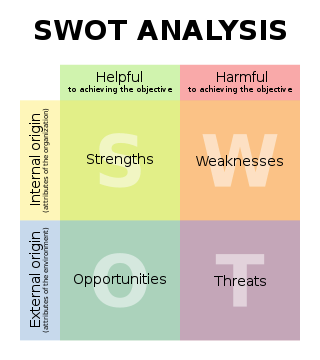
SWOT matrix

When you do presentations more related to technical marketing, you may want to use colored blocks, for example to clearly discriminate between pros and cons by using green respectively red boxes. Since it is not in the manual, here is how you do colored boxes. Essentially, you declare new block environments in the document preamble:


\newenvironment<>{problock}[1]{

\begin{actionenv}#2

\def\insertblocktitle{#1}

\par

\mode<presentation>{

\setbeamercolor{block title}{fg=white,bg=green!50!black}

\setbeamercolor{block body}{fg=black,bg=green!10}

\setbeamercolor{itemize item}{fg=red!20!black}

\setbeamertemplate{itemize item}[triangle]

}

\usebeamertemplate{block begin}}

{\par\usebeamertemplate{block end}\end{actionenv}}

\newenvironment<>{conblock}[1]{

\begin{actionenv}#2

\def\insertblocktitle{#1}

\par

\mode<presentation>{

\setbeamercolor{block title}{fg=white,bg=red!50!black}

\setbeamercolor{block body}{fg=black,bg=red!10}

\setbeamercolor{itemize item}{fg=green!20!black}

\setbeamertemplate{itemize item}[triangle]

}

\usebeamertemplate{block begin}}

{\par\usebeamertemplate{block end}\end{actionenv}}


The notation for banged color shades is as follows: 10% red is specified as red!10, while green!20!black means 20% green with 80% black.

In the document part, a SWOT matrix slide would then be specified as follows:


\begin{frame}{SWOT Matrix}

\begin{columns}[t]

\begin{column}{.5\textwidth}

\begin{problock}{\textsc{strengths}}

\begin{itemize}

\item Business

\begin{itemize}

\item revenue: \$10 B

\item market share: 70\%

\end{itemize}

\item Product

\begin{itemize}

\item 32-bit color

\item written in OpenCL

\end{itemize}

\end{itemize}

\end{conblock}

\end{column}

\begin{column}{.5\textwidth}

\begin{conblock}{\textsc{weaknesses}}

\begin{itemize}

\item Business

\begin{itemize}

\item very expensive

\item gold plating issues

\end{itemize}

\item Product

\begin{itemize}

\item requires at least 128 cores

\item no gamut mapping

\end{itemize}

\end{itemize}

\end{problock}

\end{column}

\end{columns}

\begin{columns}[t]

\begin{column}{.5\textwidth}

\begin{problock}{\textsc{opportunities}}

\begin{itemize}

\item Business

\begin{itemize}

\item everybody wants color

\item clouds love rainbows

\end{itemize}

\item Product

\begin{itemize}

\item cameras deliver 14 bits per pixel

\item big data is pervasive

\end{itemize}

\end{itemize}

\end{conblock}

\end{column}

\begin{column}{.5\textwidth}

\begin{conblock}{\textsc{threats}}

\begin{itemize}

\item Business

\begin{itemize}

\item pursue low hanging fruit

\item people do not care about color quality

\end{itemize}

\item Product

\begin{itemize}

\item competitors use CIELAB

\item spectral is a new trend

\end{itemize}

\end{itemize}

\end{problock}

\end{column}

\end{columns}

\end{frame}

Friday, October 11, 2013

now you can go paperless

In 1945 Vannevar Bush proposed the Memex desk to store and hyperlink all our documents. In 1969 Jack Goldman from Xerox approached George Pake to set up PARC with the task of inventing the paperless office of the future. By the late 1980s, with Mark Weiser's System 33 project all pieces were available and integrated to realize the paperless office of the future, including mobile computing under the name of ubiquitous computing or ubicomp.

The problem was that the computer hardware was still to far behind. A Dorado ran only at 1 MIPS and typically had 4 MB of RAM and an 80 MB disk, but its ECL technology sucked up 3 KW of power and the material cost $112K in today's dollars.

By the mid-1990s the hardware had become sufficiently powerful and cheap that people like Gary Starkweather and Bill Hewlett were able to digitize all their documents and live a paperless life, but not people like us.

For the rest of us the year to go completely digital is 2013. The current Xeon E5 chip-set offers up to 12 cores and 40 GB/s PCI express bandwidth to which you can add a terabyte of fast PCI Express flash storage for the operating system, the applications, and your indices. This is sufficient horsepower to manage, index, and transcode all your digital items.

For the digital items I had hinted at using green disks in the my previous post, but then I made a calculation and showed a picture indicating this might not be a good solution after all. Here is the solution.

In System 33 the documents were stored on file servers, which is still done today in commercial applications. But in the SOHO setting this quickly leads to the monstrosity shown in the last post's picture. Where is the sweet spot for storing our digital items?

An external disk is easy and cheap, because it relies on the PC to manage the disk. In the real world of ubicomp we have many different computing devices, so we need the flexibility of a server. The solution is to use a disk with a minimalistic server, a contraption called a NAS, for network attached storage.

A typical NAS for SOHO

Because the various ubicomp devices have different file systems and file protocols, a NAS will have its own system and then provide the various native interfaces. Typically, the NAS operating system is a bare-bones Linux with an ext4 file system. It will support the main file protocols NFS, CIFS, AFP, FTP, SSH, WebDAV, TLS, etc.

Since your digital items are valuable, you do not want to use a single disk, also because with a large amount of data, backups of shared disks no longer make sense (you still need to backup your own devices). The minimal configuration is to use two identical disk drives in RAID-1 configuration. You also want to have a second NAS on a different continent to which you trickle-charge your digital items.

The box in the picture above is a Synology DS212j, which uses a Marvell 6281 ARM core running at 1.2 GHz. The SoC also includes hardware encryption (yes, you should always encrypt all your data) and a floating point unit. The latter is important because many digital items these days are photographs and an FPU is absolutely necessary to create the thumbnails (for video, you want to do any transcoding on your desktop and store the bits so that they can be streamed directly).

The assembly in the picture comprises the NAS box with the mini-server in the enclosed bottom, a large fan, and the two red disks. On the right side (front) are the status lights and on the left side (back) are the Ethernet port, the power port, a USB port to back up the NAS' own software and data on a stick, and a USB port for a printer to share.

The box in the picture has 512 MB of x16 DDR3 DRAM, which is plenty to run a bare-bones Linux, including such things like a MySQL database to manage the NAS data and a web server to administer the system. You want to attach it to a 1 gbps Ethernet using Cat-6 cabling (but Cat-5e is sufficient for a small home like mine).

When being accessed, the NAS will consume 17.6W + 9W = 26.6W, but when there is no network activity, the disks will go in hibernation mode and the power consumption will drop to 5.5W + 0.8W = 6.3W (the first number is the mini-server, the second is for the disks). In other words, a capable SOHO NAS capable of storing and serving all your digital items uses power comparable to a light bulb. You do not need any special electric service to your garage.

As we have seen regarding the disk colors, you absolutely want a pair of red disks, i.e., two Western Digital WD40EFRX or two Seagate ST4000VN000-1H4168.

Thursday, October 3, 2013

disk service time

In the last post we saw how hard disk drives (HDD) are color coded. I hinted on how to choose the color of a HDD, suggesting that for the main disk a solid state drive (SSD) is actually a better choice, but I left things fuzzy. The reason is that there is no single metric, you have to determine what your work day looks like. Fortunately there is one thing that no longer is an issue: capacity.

Wednesday, September 25, 2013

a red disk never comes alone

The disk industry has undergone an incredible consolidation: there are only three companies left. Toshiba is focused on laptop disks, while Seagate and Western Digital manufacture the whole range. In this battle to the last tooth, the color of disks has become an important survival tool.

a red disk never comes alone