Showing posts with label informatics. Show all posts

Wednesday, January 19, 2011

Parallel Processing for Image Recognition

In a few days, imaging technologists from around the world will be flocking to the San Francisco Airport Hyatt to attend the Electronic Imaging Symposium.

Monday 24 January from 10:40 AM to 11:10 AM many delegates will fasten their seat-belts in Sandpebble Room D, where IS&T Fellow and HP Labs Director and Distinguished Technologist Dr. Steven J. Simske will be giving his Invited Talk on Parallel Processing Considerations for Image Recognition Tasks in the Conference on Parallel Processing for Imaging Applications.

Many image recognition tasks are well-suited to parallel processing. The most obvious example is that many imaging tasks require the analysis of multiple images. From this standpoint, then, parallel processing need be no more complicated than assigning individual images to individual processors. However, there are three less trivial categories of parallel processing that will be considered in this paper: parallel processing (1) by task; (2) by image region; and (3) by meta-algorithm.

Parallel processing by task allows the assignment of multiple workflows—as diverse as optical character recognition [OCR], document classification and barcode reading—to parallel pipelines. This can substantially decrease time to completion for the document tasks. For this approach, each parallel pipeline is generally performing a different task. Parallel processing by image region allows a larger imaging task to be sub-divided into a set of parallel pipelines, each performing the same task but on a different data set. This type of image analysis is readily addressed by a map-reduce approach. Examples include document skew detection and multiple face detection and tracking. Finally, parallel processing by meta-algorithm allows different algorithms to be deployed on the same image simultaneously. This approach may result in improved accuracy.

Useful links:

Monday, January 17, 2011

Parallel Transparency

Technology allows everybody to do their own work without assistance. When office automation software programs allowed office workers to create professional quality documents, graphic artists had to take the sophistication of high-concept design up to the next level, above the abilities of office tools.

One of the key techniques has been the heavy usage of transparency. Consequently, commercial printers see a large number of documents containing transparency. The specification of transparency in PDF is very sophisticated, well above to the simple transparency used for example in video games.

Therefore, adding transparency to a GPU-based RIP is quite a challenging task. Indeed, not only has the complex PDF transparency to be implemented, but it also necessary to implement an ICC color management module on the GPU. And it all has to work on tiled images.

At the Electronic Imaging Symposium, John Ludd Recker from HP Labs will report on his experience implementing GPU-based transparency in Ghostscript. His lecture on A GPU accelerated PDF transparency engine will be in the Conference on Parallel Processing for Imaging Applications.

Useful links:

Friday, January 14, 2011

Parallel Error Diffusion

From the earliest days of digital color reproduction, there has been a need to add vector processing units to achieve viable executions times. For many imaging operations, algorithms can easily be vectorized because they operate independently on the pixels. However, some operations are spatial: sharpening, compression, error diffusion halftoning, etc.

Thursday, January 13, 2011

GPU-Completeness

In the last decade, the computing industry has undergone a major revolution: software from suites to apps and hardware from workstations to mobile devices. The hardware platform of choice is no longer a souped up high clock-rate server class microprocessor but a system on a chip (SoC) combining a CPU, GPU, memory controller, etc., all running at very low power. The challenge is then how to partition a computation between CPU and GPU, which is done at runtime through an OpenCL kernel. This kernel is very difficult to write, because today it is based on arcane heuristics, not on an algorithm based on the system's current state.

At the Electronic Imaging Symposium, Dr. I-Jong Lin from HP Labs will present a new theory to solve this problem. His lecture on GPU-Completeness: Theory and Implications will be in the Conference on Parallel Processing for Imaging Applications. In a nutshell, when an algorithm is transformed from serial to parallel, there is a loss of accuracy. When the accuracy vs. parallelism trade-off is exponential rather than polynomial, the problem belongs in the class of GPU-Completeness.

The algorithmic class of GPU-Completeness is defined in terms of input, output, parallel performance, and a quality metric. Dr. Lin will validate his theory with experimental data from imaging applications: color transformation, halftoning, and run length encoding.

Useful links:

Tuesday, January 4, 2011

Register today for EI

Today is the last day to save $100 over onsite pricing for the Electronic Imaging symposium registration.

Thursday, June 3, 2010

Concurrency haiku

The first computers were mechanical and were programmed mechanically using punched cards, like Jacquard's 1801 loom

Close-up view of the punch cards used by Jacquard loom on display at the museum of science and industry. Photograph taken by George H. Williams in July, 2004.

or were not programmable at all, like Babbage's 1849 difference engine. When the first electronic computers became available, the programming tool was a soldering iron. Thus, Jacquard's loom for a long time was much better than what came thereafter. Until Zuse's 1941 Z3, which was programmed with paper punched tape.

Wednesday, May 5, 2010

The performance of JPEG implementations

1. DCT ALGORITHMS

JPEG compression is a method consisting of the following steps:

  1. Transform the color coordinates to an opponent color system
  2. Subsample the chromatic coordinates, for which the human visual system's (HVS) MTF is about half
  3. Decorrelation: perform a discrete cosine transformation (DCT) to de-correlate the spatial
    information
  4. Quantization: truncate the coordinates to exclude spatial information invisible to the HVS
  5. Entropy coding: compress the data using run-length encoding followed by Huffman encoding

Saturday, February 13, 2010

100 Billion Operations per Second with Parallel Image Processing

Taking a break from videos about digital presses (1,2,3,4,5,6 & 7), let's look at parallel processing for imaging. Giordano has previously solicited participation on this topic but surely there are some related videos out there? First up is a video about a parallel image processing system that is capable of "as many as 100 billon operations per second". (1 minute 41 seconds)


This video also states "the key to image recognition is parallel processing." (49 seconds) Of course high speed image recognition makes me think of a robotic system with the uncanny capability of following a gray sphere (see next video).

Wednesday, February 3, 2010

Parallel Processing for Imaging

We are planning to start a new conference on Parallel Processing for Imaging. If you have any ideas, suggestions, or want to contribute on the program committee, please shoot me an email.

Saturday, January 23, 2010

EI papers available online

Our EI papers are now available online from the SPIE Digital Library:

Font rendering on a GPU-based raster image processor: http://dx.doi.org/10.1117/12.839486

Color naming: color scientists do it between Munsell Sheets of Color: http://dx.doi.org/10.1117/12.846957

Thursday, January 14, 2010

Feeding big iron

Back in the mid-eighties, things were looking good for big iron printers. Tibor Fisli was getting very nice uniform dots with his quad-spot laser diodes and Gary Starkweather was succeeding with his 4000 dpi follower to the Platemaker, while Nick Sheridon was cranking up the printer speed to 300 ppm. The challenge for us in the Computer Science Lab was to be able to drive this big iron at speed.

The graphic designers who were producing their material digitally on scanners from Crosfield, Hell, and Scitex were suffering from hardware that was much slower than they could lay out a spread. Therefore, the next big investment of a successful pre-press house was the acquisition of a vector processor, which allowed feats like rotating an image. Parallel computing is key in the graphic arts and printing.

This told us that the way of the Dorado with its ECL logic was not the right way. The follower would be a multi-processor system with CMOS logic. Thus the Dragon was designed, and considerable effort went into simulations to balance the system architecture.

The simulations showed that scalability works only up to 8 processors. Adding more processors did not increase linearly Dragon's performance, but it was still a very powerful machine at the time.

Then came what Nathan likes to call a tenuki. Smart politicians realized that instead of out-braining the evil empire we can just out-spend it and destroy it that way. This marked the end of research and the beginning of out-sourcing. What counts is price, not performance, so everything just became done incrementally where ever the wages were lowest.

Until now. CMOS has hit the wall and is not getting faster, so we are back to multiprocessing, or in today's lingo, multi-cores. In the meantime, big iron has slowly kept growing:

Scitex and Indigo printers

These are real beasts and manufacture new material that can be designed on today's powerful workstations, like posters 5 meters high and half a kilometer long, or custom photo albums where each album has completely different pictures, or variable data print jobs where each piece is customized for the specific reader:

commercial and industrial printing

When you use an industrial printer to print a building-wrap, or a commercial printer to print a million different magazines, you cannot trade complexity for time. The halftoned separations are so big you do not have time to wait for the bits to be served from a slow disk. You need to print in real-time.

How can you feed big iron?

Today's general purpose processors are not really well suited for rendering pixels. In fact, they are really a RISC in a CISC and a lot of the chip surface is used to predict branches, cache loops, interpret complex instructions, etc. This is all stuff that is not really needed when you stream a gazillion pixels through the system and apply the same rendering operations to them.

CPU core

What you want is not a fancy core with most of the silicon just sitting there while you try to feed your big iron. It is better to have a simple basic processor, but to have a lot of them, like the vector processors of yore.

GPU

Well, an important computer application are games, and gamers have similar rendering requirements as yours, but they are many more, so GPUs are inexpensive consumer products.

Until a short time ago, the GPUs were very specialized, but their architecture has changed considerably in the last few years and they have become programmable. The latest crop, combined with OpenCL, are actually simple general purpose processors that can be programmed to render all the pixels required to feed the big iron.

I have oversimplified a bit. In fact, the print job comes in the form of a PDF file, and rendering is not the only task of a RIP. There are operations like interpretation that cannot be parallelized at the pixel level und must be executed serially on general purpose cores, where for example each core works on a different page or tile.

To run the big industrial and commercial jobs, we not only need scalability down, but we also need scalability up, because there is a limit on the number of cores in a system and we would like to have multiple systems working on the same job. This is achieved with mapReduce algorithms:

mapReduce flow

In summary, to feed big iron with jobs like 5 by 500 meters size posters or 1 million different book pages you need scalability, and you need to be able to scale up as well as scaling down:

scalability

To learn how to achieve this, you may want to attend the Electronic Imaging Symposium in San Jose next week, where in the conference Color Imaging XV: Displaying, Processing, Hardcopy, and Applications in the session on Color Reproduction and Printing, John L. Recker will present all the gory details.

Tuesday, September 22, 2009

Ripping efficiency

The tool for deciding informatics infrastructure investments is benchmarking. In the past, the game was to invent a new performance metric, create mind-share for its superiority, and then optimize one's offerings to become the best platform according to the new metric.

Today the game is much more complex. Integrated circuits have hit the wall and it is no longer possible to simply increase the clock speed. Also, there is the new requirement of both upwards and downwards scalability: an architecture must be applicable also to cluster computing (or cloud computing) and mobile devices. One of the hot themes in benchmarking is the comparison of CPUs to GPUs, as we are now exeriencing a return of array co-processors in the form of programmable GPUs.

Recently David Kanter wrote the interesting article Computational Efficiency in Modern Processors in Real World Technologies. He uses double precision (DP) GFLOPS/s per W and DP GFLOPS/s per mm2 as the metrics. Since all integrated circuits are based on the same physics, not surprisingly these metrics do not give new insights for classical designs but show that radically different paradigms like WLIW in AMD's approach give the edge to a handful of circuits in terms of computational efficiency: ATI's RV670 and RV770, IBM's PowerXCell 8i and Intel's Atom.

For color image processing, and more specifically ripping, it is more interesting to look at the overall efficiency of a RIP (raster image processor) system, also known as DFE (digital front end) in the trade. Currently our colleague I-Jong Lin is Louisville, Kentucky for IS&T's 25th Non-Impact Printing conference, also known as NIP. There he is presenting a first paper on Proposal for Next Generation Print Infrastructure: Gutenberg-Landa TCP/IP, where he discusses GPU-based RIPs.

He explains, Graphics Processing Units (GPU) are special purpose coprocessors originally targeted at the PC gaming market. The enormous size and volume of the gaming market have driven GPU capabilities up and costs down, making GPUs into a viable and well-supported parallel computing architecture. Today, the cost of a GPU is so low that even handheld devices have a GPU.

Besides the cost reduction from using commodity hardware instead of high-performance components, an array of simple CPUs uses less power than an array of full-fledged CPUs ripping for the same high-speed printer. Let us compare an HP SmartStream Production Pro Print Server to the GPU-RIP system proposed. Since the volume of the two systems is almost the same, we do not need a full exergy destruction analysis and can just compare the CO2 footprint of the two systems.

We use the HP Power Calculator Utility and the HP workstation quick specs to compile the energy usage data. The total amount of power a device requires from the facility AC feed is known as apparent power and is measured in volt-amperes (VA). The British Thermal Unit (BTU) is the standard for measuring the capacity of cooling systems. The amount of power (Watts) consumed by equipment determines the number of BTUs/hr required for component cooling.

units
component
speed [GHz]
procs
RAM [GB]
PCI cards
HDD [GB]
[BTU/h]
VA rating
6
DL360G5
3.2
1
4
2
146
1135
353
5
DL380G5
3.2
1
4
2
146
1178
362
1
MSA50
298
87
1
Procurve
1382
405

The table above lists the data for the conventional Digital Front-End (DFE) RIP. Multiplying the ratings for each system component with the number of units of that component and adding up yields a total BTU/h of 14,380 and VA rating of 4,420.4. The table below lists the data for our experimental GPU-RIP. Multiplying the ratings for each system component with the number of units of that component and adding up yields a total BTU/h of 4,200.96 and VA rating of 1233.36.

units
component
speed [GHz]
procs
RAM [GB]
PCI cards
HDD [GB]
[BTU/h]
VA rating
1
ML370G5
3
3
4
2
72
913
270
4
Z800
2
2
3
1
250
822
241

Assuming the RIP will be operated in a factory building, it will probably not need special cooling. Therefore, we can limit our calculations to the total system VA rating. Assuming a continuous full-capacity workload for an entire year, the DFE-RIP will consume 38,723 KWh and generate 23,234 Kg of CO2. For the GPU-RIP the corresponding numbers are 10,804 KWh and 6,483 Kg, i.e., the GPU-RIP in a year will generate 16,751 Kg less CO2. To put this number in context, we used an online CO2 footprint calculator and entered the largest car owned by the authors and the miles it was driven over the last year. The calculator determined his car generated 1.52 tonnes of CO2. Thus, with the CO2 saved by the GPU-RIP in a year, he can drive for 12 years, or if just two of you esteemed readers deploy a GPU-RIP instead of a DEF-RIP, in one year you will have offset his total lifetime CO2 footprint so far.

These are the numbers we have so far. In vero, the assumption of a continuous full-capacity workload for an entire year is not realistic. In a second paper with title Numerical Simulation and Analysis of Commercial Print Production Systems, I-Jong Lin presents a new simulation system, that will allow us to make realistic predictions of ripping efficiency in terms of the CO2 footprint as a performance metric.

Friday, September 18, 2009

CUDA and OpenCL

Parallel computing on a GPUs is undergoing two paradigm shifts: in the early days of GPU computing, GPUs where hard-wired for graphic rendering and the programming paradigm was to express generic operations in terms of rendering and texture mapping operations. In a first paradigm shift (since NVIDIA's G80), the hardware architecture has been changed to allow general parallel computations, embodied in CUDA. The upcoming paradigm shift is a new software architecture to allow scalability and portability, embodied in the OpenCL technology. These two disruptive changes will require different algorithms to achieve the aspirational goal of a performance improvement of two orders of magnitude over current implementations.

Tuesday, May 5, 2009

The performance myth

After a few years of developing in Java then in Matlab, I am now back maintaining code written in ANSI C. Mind you, the code is masterfully architected and written, you could not write it better in Smalltalk. This is industrial strength code that is expected to be very robust and highly performant.

Programmers often state you can write much faster code in C than in Java. As I implement my changes and additions, I find myself having to write ancillary code taking care of variable initialization, bounds checking, and object finalization. Also, I get bitten by side-effects while running regression tests.

Once I have added that ancillary code, a C program is no longer faster than a Java program. In fact in Java those functionalities are taken care of through very tightly written code in the run time system. It runs more efficiently than the code I can write while keeping the product price still within target and meeting shipping deadlines.

The dirty secret is that in C you can write lousy code that skips steps like variable initialization, bounds checking, and object finalization. This way you get faster code, but you leave open doors for malicious hackers. Also, debugging and maintenance of such code is much more expensive.

Speaking of code expense, although programmers are cheap, my time spent writing and debugging that ancillary code is also a cost.

In summary, you can write equally efficient commercial programs in Fortran, C, C++, C#, Smalltalk, Java, and others. If you are a good architect and frugal programmer, the programs will be surprisingly similar in style and performance. However, the more modern a language is, the less time it will take you to get there, and the less ugly code written by others you will encounter.

Vintage cars can be sexy, but I prefer the comfort of airbags, antilock brakes, traction control, and electronic fuel injection.

Operator programming a PDP-6 using papertape

1964: Tops 10 is developed as the major user software interface for Digital's 36-bit machines. Tops 10 was developed from a 6-K word monitor for the PDP-6. It included user files and I/O device independence, and a command control program.

Tuesday, December 9, 2008

A wimp's 40th birthday

Industry analysts generally equate modern personal computing with the GUI, or graphical user interface. Therefore, March 1992 is generally seen as the birth of the PC, namely the release date of Windows 3.1.

There is then another group of analysts that then counters the GUI was really invented on 24 January 1984 when the Macintosh was released. Of course others then claim the GUI is older than that when Smalltalk with its WIMP paradigm was invented at Xerox PARC.

Actually, the WIMP paradigm is even older than PARC. The PC was really invented concomitantly with the mainframe, and the main person behind it was "Lick" Licklider. You can read up the PC's history in M. Mitchell Waldrop's "The Dream Machine."

Anyway, the acronym is WIMP, which stands for windows, icons, mice, and pointing. That goes back to 40 years ago.

It the PC's history was linear, today we would use them to solve partial differential equations. The basic idea was time sharing, later called adaptive computing and today called cloud computing. Not a reason to spend money on an iPhone, Blackberry, or Netbook.

The paradigm shift occurred in San Francisco on 9 December 1968 at 1 p.m. at the ACM conference, when Doug Engelbart demonstrated his On-Line System or NLS. It was about augmenting human intellect, and in a single demo (a.k.a. The Mother of All Demos) he introduced concepts like windows, hypertext, mice, cording keyboard, collaborative software (groupware), video chatting, networking, and more to a stunned crowd still using punched cards.

The celebrations are this afternoon at Stanford in the Memorial Auditorium.

Happy Birthday, WIMP!

Saturday, December 6, 2008

Colored geese

When I did my first steps in image processing, researching new algorithms was not for the faint of heart. First you had to be a maestro programmer (a.k.a. wizard) because to get the algorithm to run with a usable performance on a sub MHz processor with 64K bytes of memory you had to write a paging algorithm to fit it all in memory and code the inner loops in octal code so not to miss any clock cycles and work directly on the barrel shifter. You also had to stick an exception handler at the beginning of the boot loader to catch processor faults and get a chance at debugging your algorithm.

A first quantum leap happened when Photoshop came out, because you could first try out things interactively, then you could write a plug-in with your algorithm.

The next quantum leap happened with MatLab, which contains well programmed image processing libraries that allow you to quickly implement your algorithm expressing it as a linear algebra problem.

A new quantum leap is happening now with Mathematica, which now allows images as parameters, contains an image processing library, and gives you the full power of symbolic computing. Read more about it in this blog post by Theodore Gray. [Click the image to view the movie.]

Colored geese--click to view movie

Many thanks to Don O'Shea for the pointer.

Wednesday, March 26, 2008

Performance update

A year ago I posted two entries on hyperthreads and multicores that were relatively popular. A short post on the the Performance Agora has an interesting comparison of the performance of the latest crop of Intel chips suggesting that the 8-way Penryn TPC-C performance now matches a 16-way Xeon of 2 years ago.

Performance experts like Neil Gunther worry mostly about database transactions and servicing HTTPS requests. For us color scientists working on color reproduction systems, the performance picture is different. Historically, we have always been fighting with the problem that we are ten years behind marking engine designers in terms of ripping pages as fast as the printers can consume them.

For us the hour of truth will come at the end of this year, when Intel will start shipping Nehalem. We will have to revisit our software architectures to take advantage of the new QuickPath platform architecture with fast integrated memory controllers. With QuickPath each processor has its own dedicated memory, so we will have to redesign how we map rendering in memory.

Faster bus and better stall prevention, will probably allow us to use more GPUs per system, which will likely require we rearchitect our whole rendering pipelines.

For more details on Nehalem, see Intel's whitepaper. For more details on QuickPath, see this other withepaper.

Friday, March 21, 2008

More on print services

My post about print services appears to have caused some confusion. While I prefer to get feedback in the form of comments, so others can also comment and a dialogue is established, here are some clarifications — at the risk of making things even muddier.

The first confusion is when the same word is used for something different, a subtle polysemy problem. What we call now the Internet, was called the ARPAnet thirty years ago. At that time Xerox had Ethernet local area networks (LAN) at its sites, and they were interconnected through gateways to create the Xerox Internet. This Internet was a node on the ARPAnet and used the same naming scheme, so it was seamlessly integrated. For example, you could write my email address as beretta.pa@xerox.com or as beretta@pa.xerox.com.

PARC was also connected to other networks, like the DecNet, but is was not seamlessly integrated and your email address had to finish in !ucb!parc|beretta to find its way to a gateway from which I could access it.

Thirty years ago was before the general availability of workstations, so the ARPAnet did not have many nodes. However, the Xerox Internet had thousands and workstations. Therefore, the researchers at PARC had to solve all the scalability issues before anybody else was even aware of them.

While the Internet connects logical machines, the World Wide Web hyperlinks documents, using a protocol called HTTP. Initially the Web was mostly text-based, but then its inventor at CERN found out how easy it was to implement a graphical browser on the NeXT system, and the rest is history.

first graphical browser

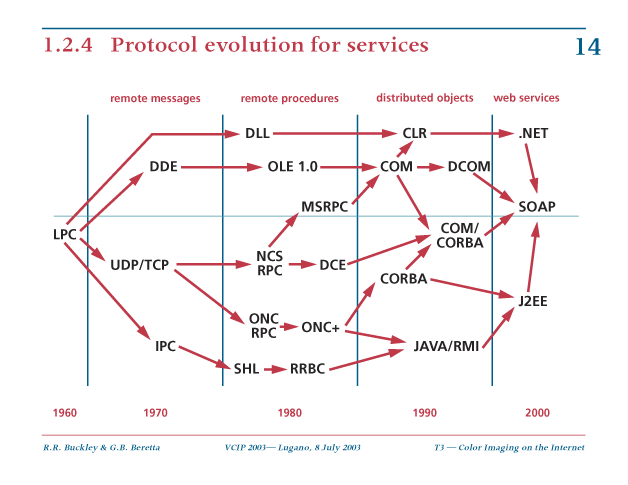
Next, RPC did not disappear, but it was constantly metamorphing. Here is a diagram of the protocol evolution for services Rob Buckley drew several years ago. It stops at 2000, and now there is a number of web service frameworks, a list of which you can find on the Wikipedia.

protocol evolution for services

A popular way to represent Web service architectures is using the so-called three-tier architecture concepts.

three tier architecture concepts

Two popular models are Microsoft's .net and Sun Microsystem's J2EE.

.net to J2EE model comparison

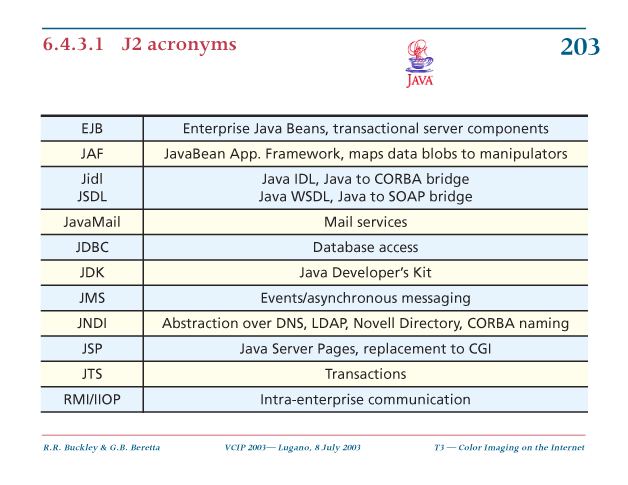
The jargon on the right hand side can be decoded with this J2 acronym list.

J2 acronyms

Finally, print services are not used just for printing but also for proofing. The latter is somewhat delicate, because the print provider needs to maintain control of the proofing device and the viewing conditions. One approach is to use a remote sensor to assess the ambient conditions and then apply a color appearance model (USP 6,078,732 etc.). Another approach is to use an electronic color proof (ECP) node that mediates the sharing of information about the capabilities of nodal color devices, the interpretation of color image data to the devices, and the control of color reproduction (USP 6,157,735 etc.).

remote printing and proofing

Wednesday, March 19, 2008

Print services

Computer science — or informatics, as it is called more appropriately in Europe — has a less linear progress history than other technologies. Indeed, many a breakthrough technology was forgotten only to be reinvented several decades later. I had already posted on concurrent programming (in the comments) and color encoding.

For example, the idea of punching the octal codes of a program on a paper tape instead of toggling it in every time on the console switches was so straightforward it got quickly adopted. But already the idea of using an assembler or compiler to generate the octal codes from a formal language took a bit longer to sink in.

Back in the Sixties and Seventies, when computer users were debating on whether 96 column punch cards were better than 80 column punch cards, computer scientists were busy inventing tools to make their professional life easier by using computer technology. However, the semantic gap from what they were doing to the reality of punch cards was so big, that most of not many of their ideas did not make it into the real world, only to be reinvented thirty years later.

One hot topic at that time was distributed computing. Long before protocols like TCP/IP, HTTP, etc. were invented, things were harder to do and had to happen a step at a time. An example was Grapevine, a multicomputer system on the Xerox research internet. It provided facilities for the delivery of digital messages such as computer mail; for naming people, machines, and services; for authenticating people and machines; and for locating services on the internet. You can read about it in Andrew D. Birrell, Roy Levin, Roger M. Needham, and Michael D. Schroeder, Grapevine: an exercise in distributed computing, Communications of the ACM, Volume 25, Issue 4 (April 1982), Pages: 260-274.

Once we can exchange digital messages and name entities, we can call procedures or invoke methods on a different machine. As we can read in the first paragraph of Andrew D. Birrell and Bruce Jay Nelson, Implementing remote procedure calls, ACM Transactions on Computer Systems, Volume 2, Issue 1 (February 1984), Pages: 39-59,

The idea of remote procedure calls (hereinafter called RPC) is quite simple. It is based on the observation that procedure calls are a well-known and wellunderstood mechanism for transfer of control and data within a program running on a single computer. Therefore, it is proposed that this same mechanism be extended to provide for transfer of control and data across a communication network. When a remote procedure is invoked, the calling environment is suspended, the parameters are passed across the network to the environment where the procedure is to execute (which we will refer to as the callee), and the desired procedure is executed there. When the procedure finishes and produces its results, the results are passed back to the calling environment, where execution resumes as if returning from a simple single-machine call.
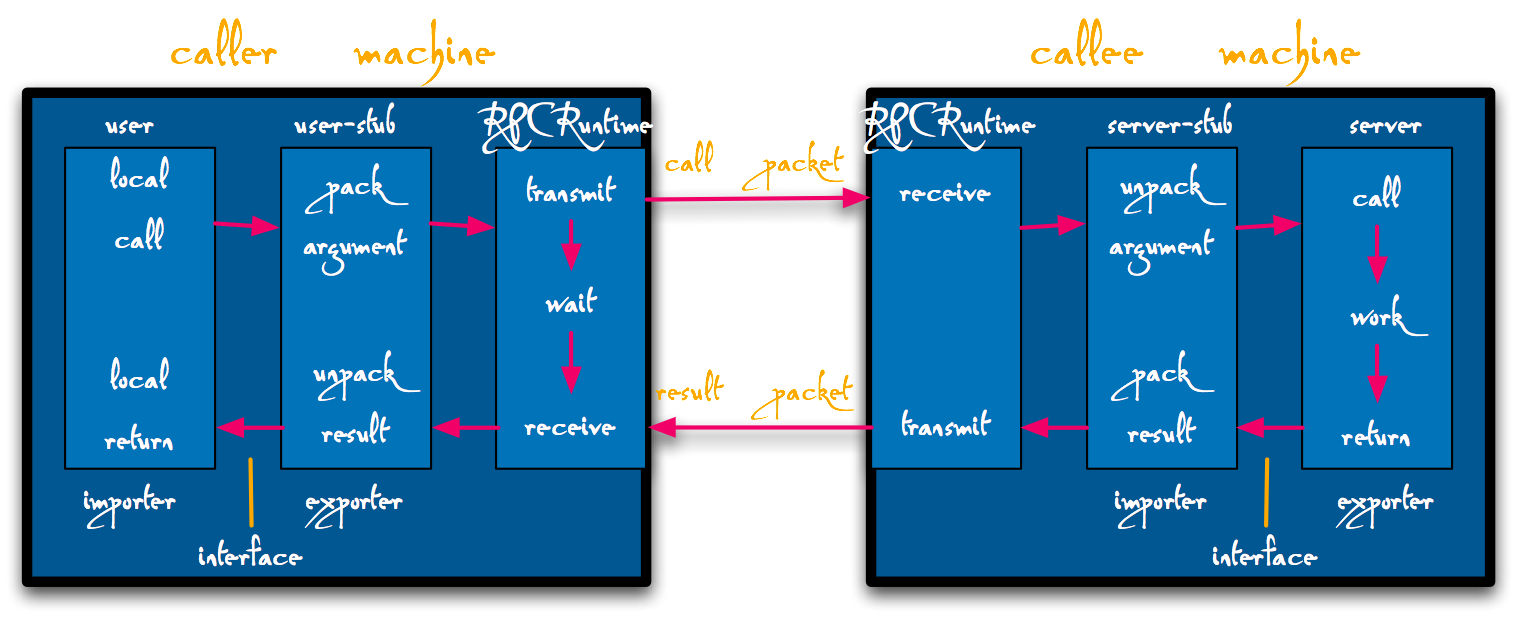
The components of the RPC system, and their interactions for a simple call

What was powerful in the Cedar implementation of RPC described in this paper, was that it came with a program called Lupine, which automatically generated the user and server stubs to marshall and unmarshall the procedure parameters into messages. Lupine was so powerful that even a dummy like me could implement a distributed service in an afternoon.

It is not that Xerox did not try to productize this technology. Indeed, it created a product version of RPC called Courier and build a whole network systems architecture on this foundation. As an example, let us look how the first print service product evolved from a research effort.

In the early days of personal computers (PC), printing was very cumbersome. It entailed powering down the PC, carrying the disk to the printer room and inserting it into the PC controlling the printer and booting it up, and finally printing. At the end the printer controller had to be powered down, the disk transferred to the original PC, which could then be booted up again.

In the mid 1970 this lead to the invention of the Ethernet for connecting a PC to a printer's controller and the development protocols to transfer data and control over the Ethernet. The basic concept underlying these protocols was RPC. The main protocol was the PARC Universal Packet (PUP).

In the late 1970s Xerox released a commercial version of this architecture, meeting the most stringent Federal requirements, under the name Xerox Network Systems (XNS). XNS supported a large number of services, among which name, authentication, gateway, time; and filing, mailing, printing, scanning, etc. Like PUP, all XNS protocols were based on RPC, specifically Courier. Later TCP/IP was able to be rapidly developed based on the experience with PUP and XNS.

XNS clients use the Printing Protocol to cause documents to be printed on a Print Service. The Printing Protocol model assumes an abstract printer service which has three distinct processing phases: spooling, formatting, and marking.

A client requests service and, if the Print Service is able to grant the request, the client is given a print request identifier. The Print Service provides status of the job, which the client can request via the identifier, as well as a capabilities ticket (Properties).

The print request consists of a list of links to the documents to be printed, as well as a request ticket (Options). The Printing Protocol includes all security requirements of the Government and a priority. The documents are transferred with the Bulk Data Transfer Protocol. The Authentication Protocol is used for security and the Time Protocol is used to manage time.

In XNS the documents have to be in the Interpress page description language, which can be regarded as a precursor of PDF. An important feature of Interpress is that all pages are independent and can be processed independently in any order, as most suitable for the printer.
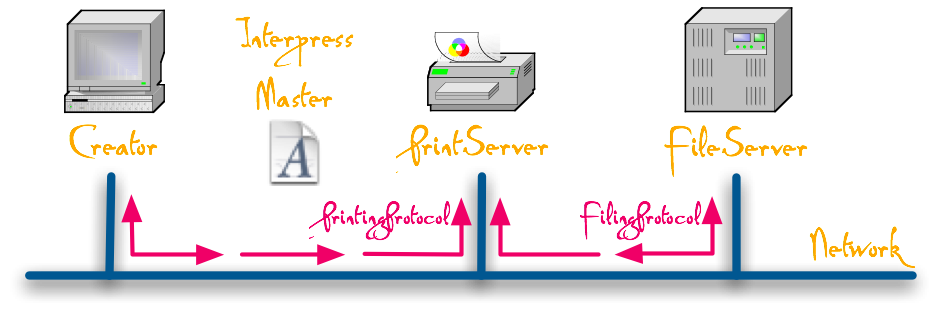
XNS Print Service architecture

An important feature of XNS Print Services is to assure that a document printed by different printers will look the same and has the same consistent high quality. To achieve this, the XNS architecture specifies the Print Service Integration Standard (PSIS). The PSIS defines the base case to which all XNS Print Services must adhere to assure compatibility. The principal areas addressed by PSIP are: Interpress level, character encoding, naming syntax, font usage, file usage, minimal service provisions, color encoding, and Printing Protocol usage (exception handling).

Tuesday, March 4, 2008

Encoding color

No matter what color space you are using, how you are compressing an image's spatial content, and in what file format you will encapsulate your image, you have to choose a color encoding standard. In this post I will write about color encoding.

One of the first color encoding standards had been proposed by Xerox in their document XNSS 289005 dated May 1990 and based on their earlier Raster Encoding Standard, which was the basis for Interpress. Color coordinates were normalized to the [0, 1] interval, but not constrained to it, to allow for the correct representation of out-of-gamut colors. For each image and each color channel, offsets and scaling factors where specified to represent the coordinate values with a certain number of bits.

In the Eighties personal computers were slow and had little memory, so efficiency was very important. It turns out that if an image is represented in the CIELAB color space with a realistic gamut, 8 bits are sufficient to store a color coordinate with sufficient precision to avoid artifacts. We then invested a considerable effort in decoding the color coordinates in a the fewest possible number of clock cycles. To implement a color management system you had to be a Cedar wizard. You also had to have a very good understanding of scientific computing, because the Xerox Color Encoding Standard also had the concept of tolerances as integral part of encoded color.

A few years later a much more pragmatic approach was taken. Color had become sufficiently cheap to be used in the office and it was necessary that an ordinary engineer be able to implement a color management system. The thinking was that by then almost all CRT monitors used the ITU-R BT.709-2 primaries, had a D65 white point, gamma 2.2, and achieved a luminance level of 80 cd/m2. With this one could require all input and output devices should be build according to this specification, and then simply normalize the RGB coordinates to [0, 225] and forget about color management systems. For good measure, the gamma non-linearity was thrown in the encoding (before, for efficiency we used only linear color model operators and did the gamma operation in firmware in the display controller).

This sRGB trick worked well for a decade. However, today, after 45 years of R&D, LCD displays have taken over and CRTs have virtually disappeared. LCDs do not have a gamma and do are not limited to the ITU-R BT.709-2 phosphor gamut. For the backlight unit (BLU) typically an active local-area dimming (ALD) direct-array of LEDs is used. These LEDs have as much as 70% external quantum efficiency and use multi-spectrum phosphors to generate a very wide color gamut.

As an aside, today's LCD technology is so fast, that color-field-sequential approaches are again considered, which eliminate the inefficiency of color filters in the panel.

Today's panels have a depth of 12 bits in each channel, a gamut that almost reaches the visual system's gamut, and can blast out 500 cd/m2 or more. True, your visual system is in film mode and you will adapt to the display, but if you just send sRGB coordinates to the display, it will look very ugly. When a modern display is unleashed, color must be managed.

Furthermore, a modern consumer digital camera can capture up to 14 bits per channel. Why do you want to throw them away by encoding your images in sRGB? Keep at least 12!

How then should you encode your color images? Fortunately there is no need to reinvent the wheel. The people in the digital effects business had to deal with these issues many years ago and developed several high dynamic range (HDR) color encoding standards. Most display controllers support at least one of them in hardware, namely Industrial Light and Magic OpenEXR (EXR). Open here refers to the C++ source code published by ILM for reading and writing OpenEXR image format files.

To learn more on this topic, Greg Ward's white paper High Dynamic Range Image Encodings is a good starting point.