Friday, January 3, 2014

Storage Investments in 2013

The investments statistics in the storage market for 2013 are out. There has been the same number of merger and acquisition deals as in 2012, namely 25, for a total of $9.5 billion. The median deal size for 2013 was $110 million, with a price to revenue median of 5×. Seventeen of the transactions were technology focused (median size $98, median P/R 6×) and eight were business focused ($214 million, resp. 1×).

As for venture funding in storage, there has been a slight decline from $978 million in 2012 to $955 million last year. These investments consisted of 43 rounds of $22.2 million average size. The second half of the calendar year was particularly strong with $249 million in the 3rd quarter and $249 million in the 4th quarter.

Both Seagate and Western Digital introduced very competitively priced high quality data center grade 4 TB hard disk drives. Solid state drives (flash memory) has become much faster by moving from the SATA to the PCI interface, while prices kept coming down. When you are bound by I/O rate and durability, flash memory has become less expensive than hard disks.

While storage drives have become very inexpensive on a per TB price, business people have learned the virtues of data mining, now called big data analytics. This combination of low storage price and new analytic skills is prompting organizations to retain more of their data and harvest it. Data has become the new gold.

Just having petabytes of data is not very useful: you have to be able to access and deliver it. This is not straightforward and this is why so much investment is occurring in the storage industry. Those who can solve the data access and delivery problem will be the ones building long lasting successful businesses and are receiving the investors' attention.

Monday, December 16, 2013

Business Model Innovation

A cute video on business model innovation from the University of St.Gallen (HSG):

Saturday, November 30, 2013

Setting up the Volumes in a NAS

In the case of a local disk, there are typically two file system layers: the partitions and for each partition the directory. A NAS is a storage system and as such has many more layers. Unfortunately the terminology is completely different. For example, we do not talk about disks but about volumes. Instead of abstraction layers, we talk about virtualization. Instead of drives, in the case of NAS we talk of bays.

Let us consider a storage system with two bays and and some system flash memory. We will focus on the Synology system with the DSM operating system (built on top of Debian). The flash memory holds the operating system and the system configuration. This memory is not visible to the user or administrator. When the system is first powered up, the Synology Assistant downloaded from the web (also on the CD-ROM, but not necessarily the latest version) is run and it scans the LAN to find the Synology products. You assign a fixed IP address and install the DSM image you also downloaded from the Synology site.

After the DSM has been installed and booted up, you log into your NAS from a browser and do all the administration from there. The browser has to have Java enabled, because the GUI for DSM is an applet in a browser. You keep the Assistant around because it makes a nice status display with minimal overhead.

The next step is to format the disks and set up the directories. The first time around you do a low-level formatting, because you have to map out the bad sectors. After that, you can do quick formatting, because you just have to build the directories at the various virtualization layers and map the layers. Unfortunately the terminology in the DSM manual is a little confusing. Setting up the storage carriers is called "formatting," although you will do a much more elaborate task. You do not use one of the DSM control panels, but a separate application not shown by default on the desktop and called Storage Manager.

By default, you get a Synology Hybrid RAID, but in the case of a system with two equal disks you do not want that. At the lowest level we have a bunch of blocks on a bunch of disks. Locally, DSM runs the ext4 file system, which sees this as a number of disks with partitions and each partition having an ext4 file system.

In the hybrid configuration, each drive is divided into partitions of 500 GB size. A virtualization layer is then created where all partitions are pooled and the partitions are regrouped as follows. In the case of RAID1, one partition is made the primary, and another partition on a different drive is made its secondary onto which the primary is mirrored. This process continues until all partitions are allocated, then a new virtualization is performed where all primaries are concatenated and presented as a single primary volume. Similarly, the secondaries are concatenated in a single secondary volume.

The reason Synology has introduced the hybrid RAID concept is that in practice the customers of its very inexpensive products fill them up with whatever unused disks they have laying around. In a conventional RAID, the size of the NAS would be that of the smallest disk, with the remaining sectors of the larger disks remaining wasted. If you have a server with 4 or 5 bays, with hybrid you can use all or almost all sectors available.

With 4 TB HDD available in the red flavor for about $200, a 2-bay NAS should do it in the typical SOHO application. At that price, you want to get two equal-size drives. By the way, with only 2 drives, even with hybrid you can only use the sectors available in the smallest drive, because you have only one other drive to put the secondary volumes for mirroring. Finally, you get a RAID because disks fail, so you want to buy a third spare disk for when the first disk breaks. Since statistically the disks from a manufacturing batch tend to have the same life expectancy, you want to buy the spare disk at a slightly later time.

In the case of RAID0, all odd blocks will be the first disk and the even blocks will be on the second disk. This is called striping and it is useful for example if two users stream the same movie but start at a different time. with striping you have less contention for the head and the NAS will run faster. However, you do not have a mirror copy, so when a the first disk fails, you lose your whole NAS.

Therefore, you want RAID1, where each sector has a mirror on the secondary drive. When the first disk fails, you just replace it with the spare drive and keep going. You want to buy right away a new spare disk, because statistically the second drive will fail shortly thereafter. By the way, in the above scenario, depending on the operating system your I/O rate can actually be faster than with RAID0, because the OS will serve the data for the first user from the primary and that for the second user from the secondary, so there will be no latency due to head positioning. In a well designed system the bottleneck will be in the processor and the network.

In the case of a 2-bay RAID, you want to create a RAID1 with 3 volumes. The reason for 3 volumes is that you want to have a separate volume to present outside your firewall; in my case, I allocated 100 GB. The second volume is for backup, because typically backups behave like a gas: they fill the available volume. Modern backup programs fill an entire volume, and when it is full will start deleting the oldest versions of files. This leaves you with no space for your actual data.

The typical IT approach to backups behaving like a gas it to allocate quotas to each user. However, allocating a separate backup user with a limited quota will cause the backup program keeping nagging with a ``quota exhausted'' message. By creating a separate backup volume, the backup software will quietly manage the available space.

The third volume is the one with your actual data and you allocate the remaining sectors to it. Because the second and third volume contain all your private data, you definitively want to encrypt them, so a thief cannot easily get to it. The best encryption is disk encryption. If that is not available, make sure your NAS server has encryption hardware, otherwise it can be slow.

On a NAS with multiple volumes, the volumes are called a disk group. Therefore, in the Storage Manager wizard, you select the mode "custom" and then the action "multiple volume on RAID." Selecting "create disks" will ask you to specify the disks for the group, and of course you select all disks. For "RAID type" you select "1" and the first time around you want to select to perform a disk check, which means low level formatting.

I already gave numbers for the capacity allocation for each disk group. After formatting the first disk group yielding the first volume, you run the wizard again and get volumes 2 and 3. Unfortunately you cannot rename them, so you have to remember their purpose.

At this point, the NAS has two disk drives with an ext4 file system, which at the higher virtualization level does not yet give you any storage, because you do not yet have file systems at the higher level. You can quit the storage manager and continue with the DSM. In local storage parlance, the next step is to install a file system on each partition, which in the local case is done automatically after a disk has been formatted and partitioned. In the case of remote storage, this is achieved by creating a shared folder on each volume. On your local system this folder shows up as the mounted disk; you want to choose the name carefully, so you know what that disk icon on your desktop is.

You will probably use your NAS by mounting it on your computers. The embedded operating system on the NAS will implement various network filing protocols and translate their file operations through the various virtualization layers to ext4 operations. On your client workstation, the operating system will make your mounted remote file system look like and behave like an external disk.

For security reasons you will want to active as few protocols as possible. If you have Unix or Linux clients, you have to activate NFS. If you have Windows PCs, the protocol to activate is SMB a.k.a. CIFS. If you have a Mac, you may want to activate AFP, which will allow you to use Time Machine for backups.

Other than Time Machine, when you mount a remote system on Mac OS system without specifying a protocol, Mac OS will first try to use SMB-2, because it is the highest performance protocol. On a Mac, at first sight it would make no big difference which protocol you are using. However, the semantics for ACL is very different between -nix operating system and Windows, so which protocol you use matters and SMB appears to be the way of the future.

Other notable protocols are HTTP, HTTPS, WebDAV and FTP. The first two you would enable through an Apache Tomcat server. WebDAV and its relatives like CalDAV, etc. are only necessary if you need to edit directly data on the NAS. You want to avoid activating and using FTP, because it sends the password in clear text: use SSH instead.

Friday, October 18, 2013

colored blocks in Beamer

Update: see here for better ways.

The beauty of LaTeX is that you get the best possible typography while focusing on the content, without having to spend any cycles on the looks. For example, when you prepare a presentation, you just pick a theme and do your slides. If you do not like how they look, you change the theme. Consequently, the Beamer class manual just teaches you how to create the flow (overlays, etc.) of a presentation.

In the second part the Beamer manual gives in detail all the information on how to create a new template, but this is too much when you just need a small feature like colored blocks. This is something that usually does not occur in technical presentations, where there already is a specialized block machinery for theorems, examples, etc.

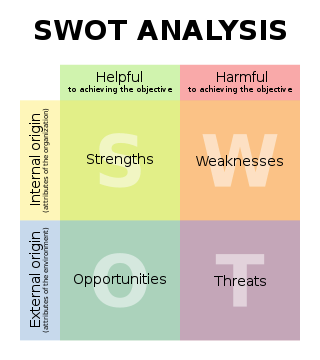
SWOT matrix

When you do presentations more related to technical marketing, you may want to use colored blocks, for example to clearly discriminate between pros and cons by using green respectively red boxes. Since it is not in the manual, here is how you do colored boxes. Essentially, you declare new block environments in the document preamble:


\newenvironment<>{problock}[1]{

\begin{actionenv}#2

\def\insertblocktitle{#1}

\par

\mode<presentation>{

\setbeamercolor{block title}{fg=white,bg=green!50!black}

\setbeamercolor{block body}{fg=black,bg=green!10}

\setbeamercolor{itemize item}{fg=red!20!black}

\setbeamertemplate{itemize item}[triangle]

}

\usebeamertemplate{block begin}}

{\par\usebeamertemplate{block end}\end{actionenv}}

\newenvironment<>{conblock}[1]{

\begin{actionenv}#2

\def\insertblocktitle{#1}

\par

\mode<presentation>{

\setbeamercolor{block title}{fg=white,bg=red!50!black}

\setbeamercolor{block body}{fg=black,bg=red!10}

\setbeamercolor{itemize item}{fg=green!20!black}

\setbeamertemplate{itemize item}[triangle]

}

\usebeamertemplate{block begin}}

{\par\usebeamertemplate{block end}\end{actionenv}}


The notation for banged color shades is as follows: 10% red is specified as red!10, while green!20!black means 20% green with 80% black.

In the document part, a SWOT matrix slide would then be specified as follows:


\begin{frame}{SWOT Matrix}

\begin{columns}[t]

\begin{column}{.5\textwidth}

\begin{problock}{\textsc{strengths}}

\begin{itemize}

\item Business

\begin{itemize}

\item revenue: \$10 B

\item market share: 70\%

\end{itemize}

\item Product

\begin{itemize}

\item 32-bit color

\item written in OpenCL

\end{itemize}

\end{itemize}

\end{conblock}

\end{column}

\begin{column}{.5\textwidth}

\begin{conblock}{\textsc{weaknesses}}

\begin{itemize}

\item Business

\begin{itemize}

\item very expensive

\item gold plating issues

\end{itemize}

\item Product

\begin{itemize}

\item requires at least 128 cores

\item no gamut mapping

\end{itemize}

\end{itemize}

\end{problock}

\end{column}

\end{columns}

\begin{columns}[t]

\begin{column}{.5\textwidth}

\begin{problock}{\textsc{opportunities}}

\begin{itemize}

\item Business

\begin{itemize}

\item everybody wants color

\item clouds love rainbows

\end{itemize}

\item Product

\begin{itemize}

\item cameras deliver 14 bits per pixel

\item big data is pervasive

\end{itemize}

\end{itemize}

\end{conblock}

\end{column}

\begin{column}{.5\textwidth}

\begin{conblock}{\textsc{threats}}

\begin{itemize}

\item Business

\begin{itemize}

\item pursue low hanging fruit

\item people do not care about color quality

\end{itemize}

\item Product

\begin{itemize}

\item competitors use CIELAB

\item spectral is a new trend

\end{itemize}

\end{itemize}

\end{problock}

\end{column}

\end{columns}

\end{frame}

Friday, October 11, 2013

now you can go paperless

In 1945 Vannevar Bush proposed the Memex desk to store and hyperlink all our documents. In 1969 Jack Goldman from Xerox approached George Pake to set up PARC with the task of inventing the paperless office of the future. By the late 1980s, with Mark Weiser's System 33 project all pieces were available and integrated to realize the paperless office of the future, including mobile computing under the name of ubiquitous computing or ubicomp.

The problem was that the computer hardware was still to far behind. A Dorado ran only at 1 MIPS and typically had 4 MB of RAM and an 80 MB disk, but its ECL technology sucked up 3 KW of power and the material cost $112K in today's dollars.

By the mid-1990s the hardware had become sufficiently powerful and cheap that people like Gary Starkweather and Bill Hewlett were able to digitize all their documents and live a paperless life, but not people like us.

For the rest of us the year to go completely digital is 2013. The current Xeon E5 chip-set offers up to 12 cores and 40 GB/s PCI express bandwidth to which you can add a terabyte of fast PCI Express flash storage for the operating system, the applications, and your indices. This is sufficient horsepower to manage, index, and transcode all your digital items.

For the digital items I had hinted at using green disks in the my previous post, but then I made a calculation and showed a picture indicating this might not be a good solution after all. Here is the solution.

In System 33 the documents were stored on file servers, which is still done today in commercial applications. But in the SOHO setting this quickly leads to the monstrosity shown in the last post's picture. Where is the sweet spot for storing our digital items?

An external disk is easy and cheap, because it relies on the PC to manage the disk. In the real world of ubicomp we have many different computing devices, so we need the flexibility of a server. The solution is to use a disk with a minimalistic server, a contraption called a NAS, for network attached storage.

A typical NAS for SOHO

Because the various ubicomp devices have different file systems and file protocols, a NAS will have its own system and then provide the various native interfaces. Typically, the NAS operating system is a bare-bones Linux with an ext4 file system. It will support the main file protocols NFS, CIFS, AFP, FTP, SSH, WebDAV, TLS, etc.

Since your digital items are valuable, you do not want to use a single disk, also because with a large amount of data, backups of shared disks no longer make sense (you still need to backup your own devices). The minimal configuration is to use two identical disk drives in RAID-1 configuration. You also want to have a second NAS on a different continent to which you trickle-charge your digital items.

The box in the picture above is a Synology DS212j, which uses a Marvell 6281 ARM core running at 1.2 GHz. The SoC also includes hardware encryption (yes, you should always encrypt all your data) and a floating point unit. The latter is important because many digital items these days are photographs and an FPU is absolutely necessary to create the thumbnails (for video, you want to do any transcoding on your desktop and store the bits so that they can be streamed directly).

The assembly in the picture comprises the NAS box with the mini-server in the enclosed bottom, a large fan, and the two red disks. On the right side (front) are the status lights and on the left side (back) are the Ethernet port, the power port, a USB port to back up the NAS' own software and data on a stick, and a USB port for a printer to share.

The box in the picture has 512 MB of x16 DDR3 DRAM, which is plenty to run a bare-bones Linux, including such things like a MySQL database to manage the NAS data and a web server to administer the system. You want to attach it to a 1 gbps Ethernet using Cat-6 cabling (but Cat-5e is sufficient for a small home like mine).

When being accessed, the NAS will consume 17.6W + 9W = 26.6W, but when there is no network activity, the disks will go in hibernation mode and the power consumption will drop to 5.5W + 0.8W = 6.3W (the first number is the mini-server, the second is for the disks). In other words, a capable SOHO NAS capable of storing and serving all your digital items uses power comparable to a light bulb. You do not need any special electric service to your garage.

As we have seen regarding the disk colors, you absolutely want a pair of red disks, i.e., two Western Digital WD40EFRX or two Seagate ST4000VN000-1H4168.

Thursday, October 3, 2013

disk service time

In the last post we saw how hard disk drives (HDD) are color coded. I hinted on how to choose the color of a HDD, suggesting that for the main disk a solid state drive (SSD) is actually a better choice, but I left things fuzzy. The reason is that there is no single metric, you have to determine what your work day looks like. Fortunately there is one thing that no longer is an issue: capacity.

Wednesday, September 25, 2013

a red disk never comes alone

The disk industry has undergone an incredible consolidation: there are only three companies left. Toshiba is focused on laptop disks, while Seagate and Western Digital manufacture the whole range. In this battle to the last tooth, the color of disks has become an important survival tool.

a red disk never comes alone

Thursday, September 19, 2013

maintaining glossaries

It used to be that scientists in the average took seven years to enter in a field and make a contribution, after which they would hit a ceiling. Their institution would then offer them a sabbatical that would allow them to either get to the next level through osmosis and synergy, or change the field.

Tuesday, September 3, 2013

A new class of bipolar cells

Neuroscientists reconstructed the arrangement of neurons in a section of mouse retina after imaging the tissue with electron microscopy. FABIAN ISENSEE, JULIA KUHL; HELMSTAEDTER ET AL.It took 225 undergraduates more than 20,000 hours of work to map the wiring diagram of a 117 µm by 80 µm patch of a mouse retina. They did discover a new class of bipolar cells, however the patch was too small to determine its exact function: a larger patch is necessary. They will try to achieve this through a crowd-sourcing project known as EyeWire.

News article: Making connections in the eye

Thursday, August 29, 2013

Is veal white, pink, or red?

This is the big question of the week in Switzerland, as on the first of September the new law for the humane treatment of calves enters into effect.

When I was in the third school year, our teacher Egidio Bernasconi took us to visit the stable of our classmate Rita Spizzi. Her father was in charge of food at the private clinic Moncucco in Coremmo, just behind our school building. Besides the large vegetable garden, he also had half a dozen cows, and that was the topic of the lesson.

We learned about agribusiness. In the self-sustenance times, a farmer in the Prealps would have one or two cows to provide the proteins for his family. Spizzi's operation was larger, because it had to sustain a clinic instead of just a family.

A cow's main product was its milk, which had a shelf life of only a couple of days. The cream would be skimmed off and cultured for a few days to make butter, which had about a week of shelf life. The excess milk would be used to make yogurt, which had a longer shelf life. When there was a lot of excess milk, it would be used to make cheese, which depending on the type could last for a whole season.

When a cow would no longer produce milk due to her age, Mr. Spizzi would sell her to the slaughterhouse. This explains why the typical beef dish of the region is brasato: the meat had to be stewed for hours in a red wine sauce because it was very tough, coming from old cows.

Mr. Spizzi always needed enough cows to feed the patients and staff. Every spring he would walk his cows to the outskirts of town to visit a bull. Half of the off-spring would be female, and that was good, because Mr. Spizzi could select one to raise to replace the next old cow; the other cows would be raised to be sold at the fair. This is why Mr. Spizzi spend a little more money to use a select bull, as its offspring would fetch a higher price at the market.

For the male offspring there was not much use, because only few bulls are required. Mr. Spizzi would keep them as long as they can live on their mother's milk, then sell them to the slaughterhouse. Because these calves were young and milk-fed, their meat was whitish. By the way, this is why in the Insubrian culture the fancy meat is veal scaloppine.

This was a long time ago and in modern agribusiness a farmer has an order of magnitude more cows. Also, much progress has been made in cattle feed, so the farmer can make more money by feeding his calves for a longer time, yielding more meat.

This is where the animal protection groups come in and the new law for veal comes into play. When the calves are kept alive for a longer time, they would naturally eat hay and grass, roaming on the Alps. Their meat would become reddish. Although taste and nutritional value are the same, for centuries people have known that the whiter the veal, the more it was tender. Before the new law, a farmer would have been paid less per kilo if the veal was redder.

To keep the veal whiter, the contemporary farmer would keep his animals on milk and indoors, but this means that the calves are anemic and therefore tortured.

The current debate is on whether veal should be red, pink, or white. This is where color science comes into play. Instead of using color terms, the experts want to sound more authoritative by using numbers rather than words. Instead of red, pink, white, they use 38, 42, 48. They never mention a unit, so what are these numbers? Is there a new redness scale?

It turns out that the new law also introduces a new standardized method to determine the color of veal. The carcass is measured at a specified location near the shoulder with a Minolta colorimeter. The first number on the colorimeter is the color number for the carcass.

Zooming in on the pictures reveals that the colorimeter is displaying CIELAB data, so the first number is L*. Therefore, what the gastronome takes for red, pink, white, a color scientist would take for dark, medium, light.

Newspaper article on the debate (in German): Kalbfleisch-Knatsch in der Fleischbranche.